
Google site timeouts on Edge 147 & greater for Windows

Google rolled out an open web standard called Device Bound Session Credentials (DBSC) in April 2026, a process which ties your login credentials for any Google session with your computer’s Trusted Platform Module (TPM), a security chip contained in the computer. The aim is to make it difficult for malware to hijack access to your account and use it on another machine.
Google rolled out the feature in Chrome 146 for Windows, with visible availability for the feature in Edge version 147 from all documented accounts.
A number of users noted issues of not being able to access any specific Google services after a random interval back to May 2026 – with the browser responding as if to time out on any Google sites a user may request to access. Clearing caches may resolve the issue temporarily, but it returns as soon as a Google DBSC request is raised to the system.
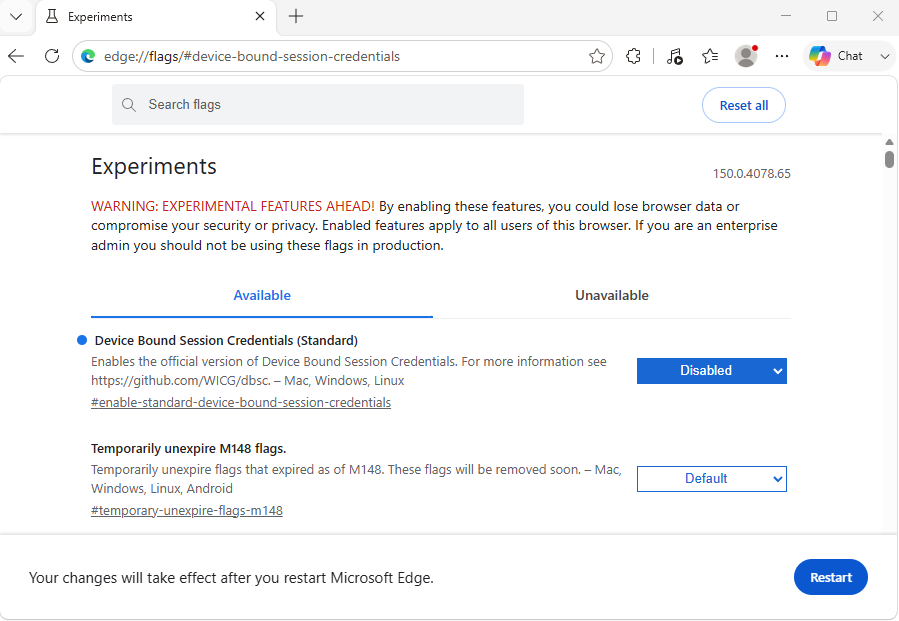
There isn’t a current fix which allows the DBSC setting to remain on in current builds of Microsoft Edge when you experience this issue, so you need to turn it off if you run the browser. To do this you can do the following:
- Open a new tab in Microsoft Edge and type edge://flags/#device-bound-session-credentials then press enter.
- At the top of the Experiments Available list that is displayed, you will find the option Device Bound Session Credentials (Standard). Click on the selectable drop box to the right of the description and select Disabled. Once a setting is changed you will see a Restart button appear to the bottom right of the window, click on this and all changes will be applied.
Microsoft has not committed to a timeline for full native DBSC support across all services despite working with Google to help design the standard. The companies current intentions are to prioritize it’s own native Microsoft Entra ID token protection from all documented accounts.